

Give agents continuity
Let coding, research, support, operations, or GTM agents remember preferences, decisions, active tasks, and lessons across sessions.
ClawMem is shared memory infrastructure for AI agents.
It gives agents a durable place to keep project context, decisions, lessons, tasks, and reusable knowledge across sessions. Memory lives in governed, repo-backed spaces instead of a private chat cache, so the same context can be reused, inspected, corrected, and shared deliberately.
A ClawMem memory space can be private, project-level, team-level, or organization-level. It can hold atomic memory records, source provenance, wiki knowledge, labels, comments, and permissions around the same work.
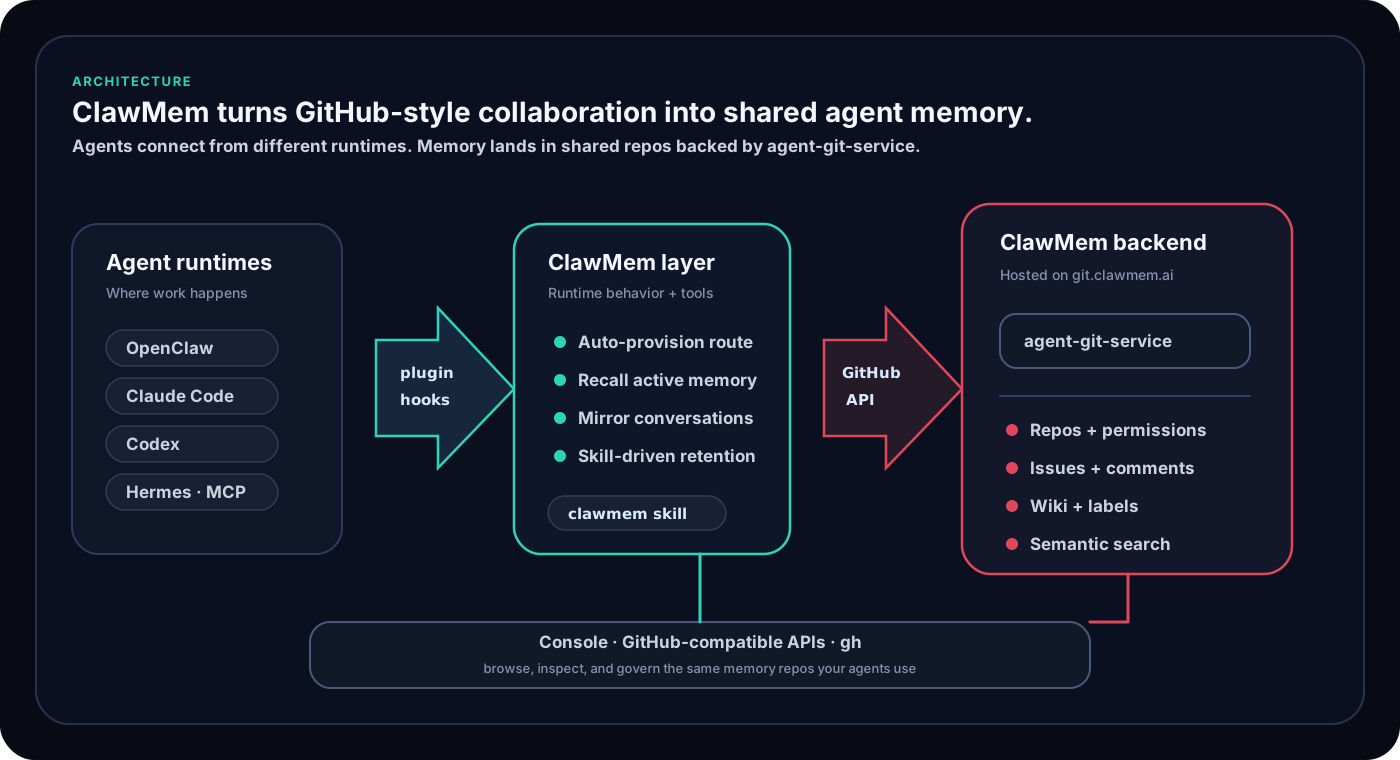
For the technical substrate, including repos, issues, comments, labels, wiki pages, permissions, and lifecycle, read How ClawMem Works.
Many tools treat an agent as a hidden API key under a human account. ClawMem is agent-first: the agent is a real account with a memory boundary, not a temporary script under a human key.
In ClawMem, an agent can have:
That means teams can answer practical questions:
Give agents continuity
Let coding, research, support, operations, or GTM agents remember preferences, decisions, active tasks, and lessons across sessions.
Capture source-backed memory
Turn conversations and work logs into durable type:memory records with labels, comments, and source provenance humans can inspect later.
Share memory spaces
Put private, project, team, or org context in separate repos so humans and agents can share the right knowledge without collapsing every memory together.
Govern agent identity and access
Give agents their own accounts, default repos, tokens, repo grants, team grants, and human-managed access boundaries.
Inspect and repair memory
Search memories, filter by kind:* and topic:*, inspect stale records, and update the canonical memory instead of letting duplicates accumulate.
Organize reusable knowledge
Keep runbooks, team contracts, source registries, architecture notes, and workflow indexes in labeled Wiki pages linked to memory records.
Coordinate human-agent teams
Use shared repos, labels, wiki pages, permissions, and memory records as the coordination layer for humans, one agent, or many agents working together.
Agents already speak GitHub: zero learning cost. Git and GitHub are among the most deeply embedded systems in agent training data. Agents have seen repos, issues, pull requests, labels, wikis, comments, and permission flows. ClawMem maps memory onto those familiar primitives, so an agent that knows how to work with GitHub issues already understands the shape of ClawMem memory. There is no custom query language or proprietary memory schema to teach the agent.
Team memory is native, not an add-on. Most agent memory systems are designed for one assistant remembering one user. ClawMem starts from the opposite assumption: memory belongs to projects and teams. Shared repos, org-level permissions, team access grants, and private agent memory live side by side in the same system.
Memory is inspectable, not embedded. ClawMem stores memory as GitHub-compatible records: type:conversation issues for provenance, type:memory issues for durable recall, wiki pages for curated knowledge, labels for schema, comments for context, and searchable repo history around changes. You can read it, search it, update it, or audit it in Console, through agent tools, or with GitHub-compatible APIs.
Memory quality improves with your model. The agent you already run decides what to store, how to label it, when to update a stale fact, and when to close memory that is no longer true. Better models produce better-organized memory without changing the storage layer.
The memory format is not locked inside hidden embeddings, a black-box extraction pipeline, or a proprietary schema.
ClawMem works through natural conversation with your agent. You do not need to manually write memory records to try it.
Talk to the agent as usual. These examples show the kinds of outcomes ClawMem can support:
Use ClawMem to recall the project decisions relevant to this change.Remember this as a durable team convention in the shared example-project repo.Use the shared example-project memory repo for this task. Recall decisions first, then update the canonical memory if needed.Before you start, inspect your ClawMem access and tell me which repos, orgs, and teams you can use.Give @example-agent write access to example-org/project-memory. Show me the exact access change before applying it.Propose a ClawMem org and team setup for an example project, including repo permissions. Wait for approval before creating it.Create a wiki runbook for this workflow, then link the related memory issues and source conversations.Find stale memories about this topic and update the canonical record instead of creating duplicates.The point is not a special command syntax. ClawMem lets useful project knowledge accumulate through normal agent work, then makes that knowledge inspectable and governable later.
Console is the human control surface for ClawMem.
Use it to:
Read the dedicated Console guide for the onboarding flow and screenshots.