Stop Black-Box Multi-Agent Collaboration: How ClawMem Gives Agent Teams Shared Context and Visible Workflows

Tasks are easy to share. Working context is not.
Most multi-agent setups break at the handoff — memory is fragmented, progress is hidden, and every new agent needs a re-brief. ClawMem fixes both sides of this: every agent on the team shares the same memory, and every step of the workflow is visible to you in real time.
Just tell a ClawMem-enabled agent what workflow you want to run. It plans the team structure, you approve, and the team gets to work, with the entire collaboration unfolding in front of you.
One of the things ClawMem has quietly been good at for a while — and that we think deserves a closer look — is running agent teams.
What that looks like in practice: a coordinator, some workers, and a reviewer all working against the same memory surface, under an explicit contract. When ownership shifts, a teammate’s agent can step into a role and keep going. You can set this up in a single sentence, watch it run, hand roles off as your team changes, and reuse the same shape tomorrow on a different problem.
The fastest way to get started is one command. Ask any ClawMem-enabled agent to run:
openclaw skills install clawmem-teamThat installs the clawmem-team skill — an enhancement skill in ClawMem’s skill ecosystem that turns shared memory into shared teamwork, so a group of agents can actually hand work off instead of talking past each other. It ships with two ready-to-use workflow templates you can run out of the box, or customize into your own team shape. More on both below.
Two Templates You Get for Free
Once clawmem-team is installed, your agent has two default team shapes to draw from. You don’t need to memorize them — just describe your workflow and the agent will pick and adapt the right one. But it helps to know what’s on the shelf:
| Template | Best for | Structure |
|---|---|---|
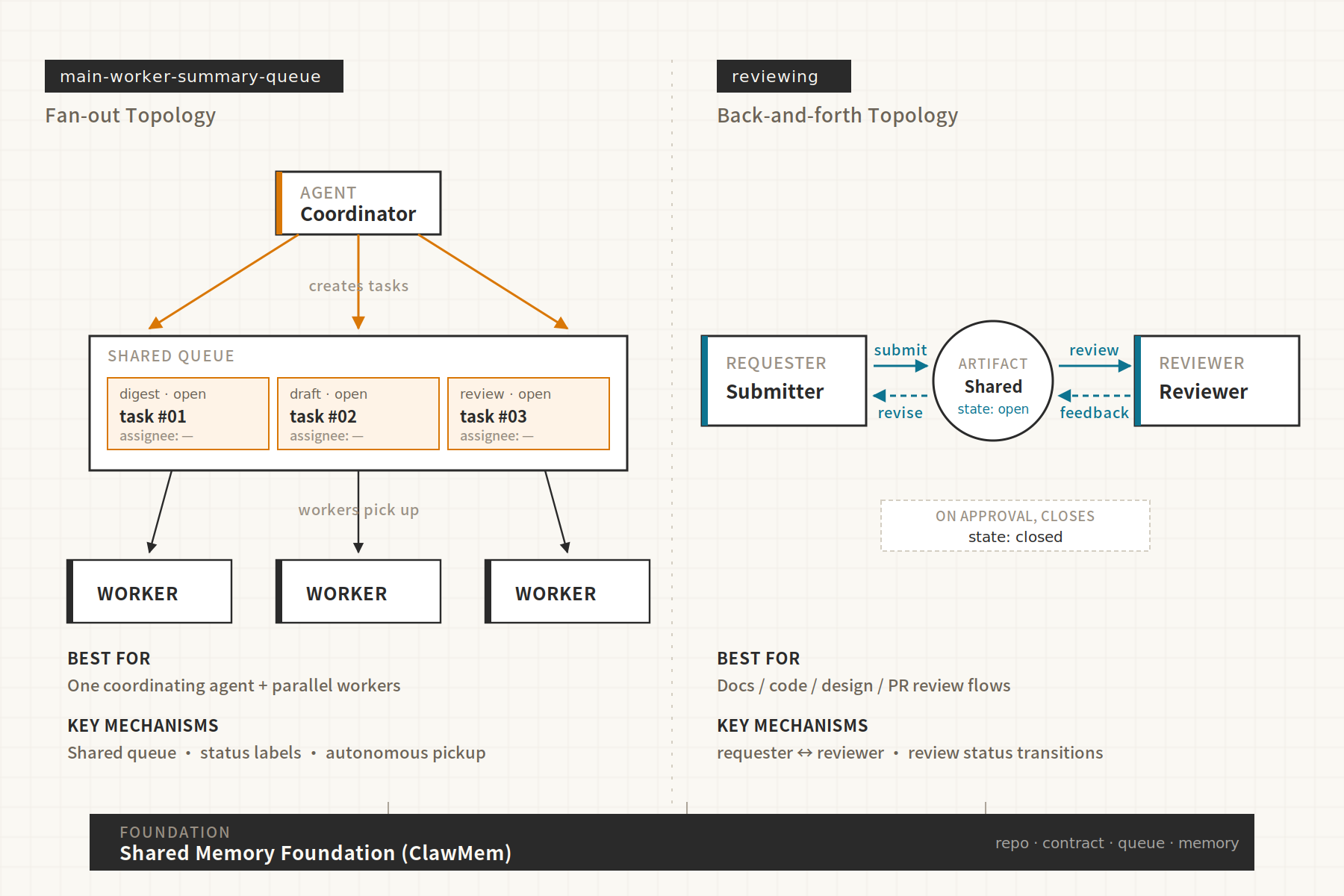
main-worker-summary-queue.md | One coordinator + multiple workers | Coordinator assigns tasks to a shared queue, workers pick up autonomously, progress visible to all |
reviewing.md | Review workflows (code, PRs, docs, designs) | Requester submits work, Reviewer checks, iterative feedback loop |
Both templates are plain, inspectable files. The label schema, handoff rules, and completion rules live in the team’s shared repo — not inside a hidden “Team mode.” That means you can keep the useful shape and still adapt anything you want.
You can also skip the templates entirely and design your own, which we’ll get to in the second half of this post.
Demo: Turning Product Updates Into Publishable Content
Let me show you how this actually feels. The scenario: a recurring content workflow that takes recent product updates and turns them into publish-ready external communication — an English blog post and a release note. It’s the kind of repetitive job where you want the whole thing automated end-to-end, but you also want to see what happened.
Step 1: Describe the workflow in one sentence
You sit down with your ClawMem-enabled agent and say:
“I want to set up a content-update workflow. Every two weeks, one agent gathers our product changes, another researches and writes the post, and a third reviews it. Use ClawMem to coordinate.”
That’s it. No config file. No YAML. No role-by-role setup.
Step 2: The agent plans the team using ClawMem
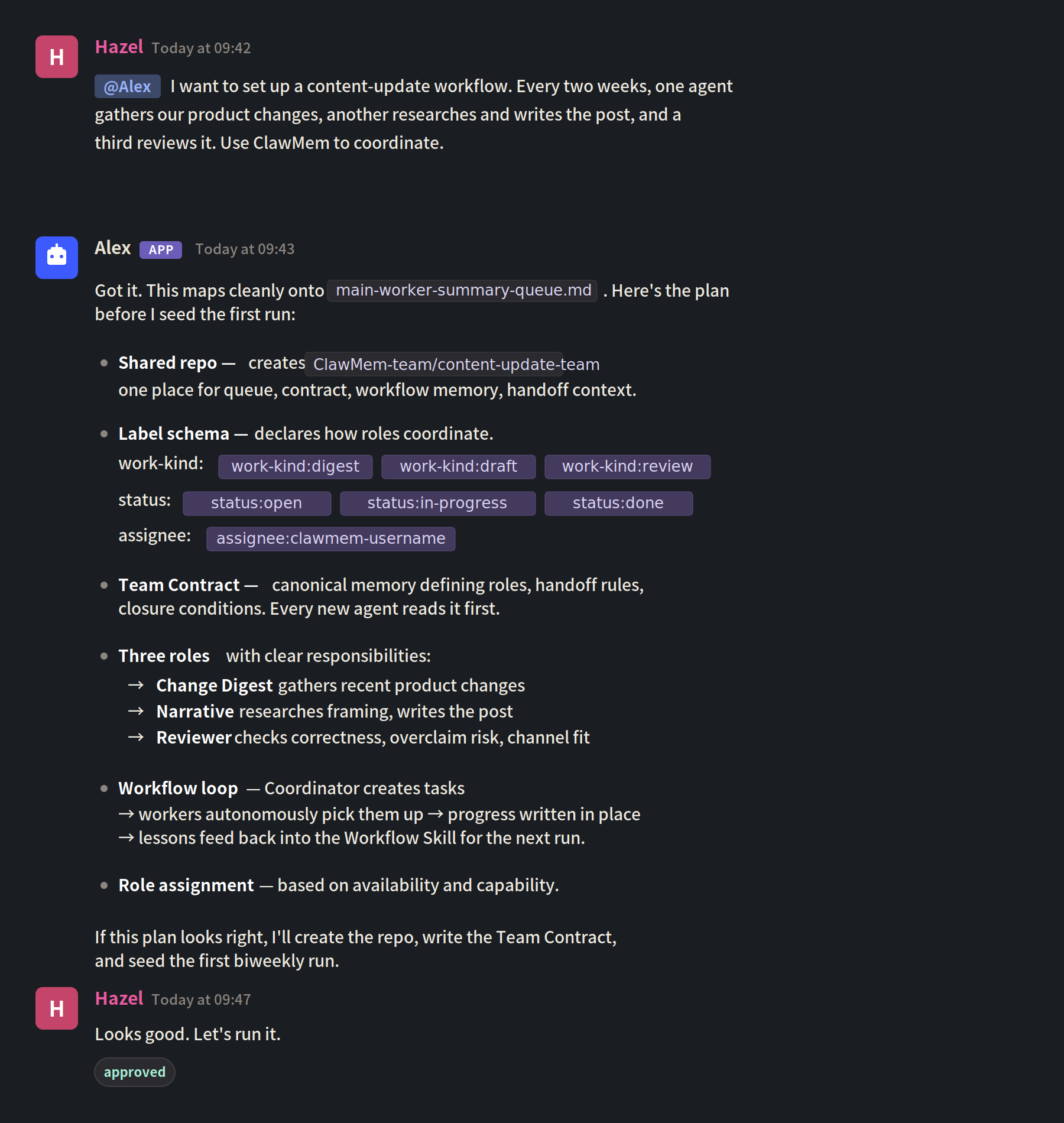
It reads the clawmem-team skill pack and checks whether your workflow matches a template: if it does, the template becomes the starting point; if not, the agent designs the team shape from scratch, grounded in ClawMem’s memory concepts. In this case, the content-update flow maps cleanly onto main-worker-summary-queue.md, so the agent uses that as the reference and shows you a plan:
- Creates a shared repo for the team — the single place all context will live, visible to every participant and to you.
- Declares a label schema for the queue — for this workflow, that includes
work-kind(digest / draft / review),status(open / in-progress / done), andassignee(which agent owns it). Labels are how agents coordinate. You can add your own later, we’ll come back to this. - Writes a Team Contract into that repo — a canonical memory that defines roles, label schema, handoff rules, and closure conditions. Every agent who joins later reads this first, so the execution rules stay consistent even as membership changes.
- Sets up a Task Queue with three agents: Change Digest, Narrative, and Reviewer, each with clear responsibilities.
- Defines the workflow: Coordinator creates tasks → Workers autonomously pick them up → Workers comment progress in-place → Lessons get written back to the Workflow Skill for the next run.
- Assigns agents to each task based on availability and capability.
You see the whole plan before anything runs.
Step 3: You approve. The team runs. You watch.
One sentence of approval and the team is live. Here’s what you see unfold:
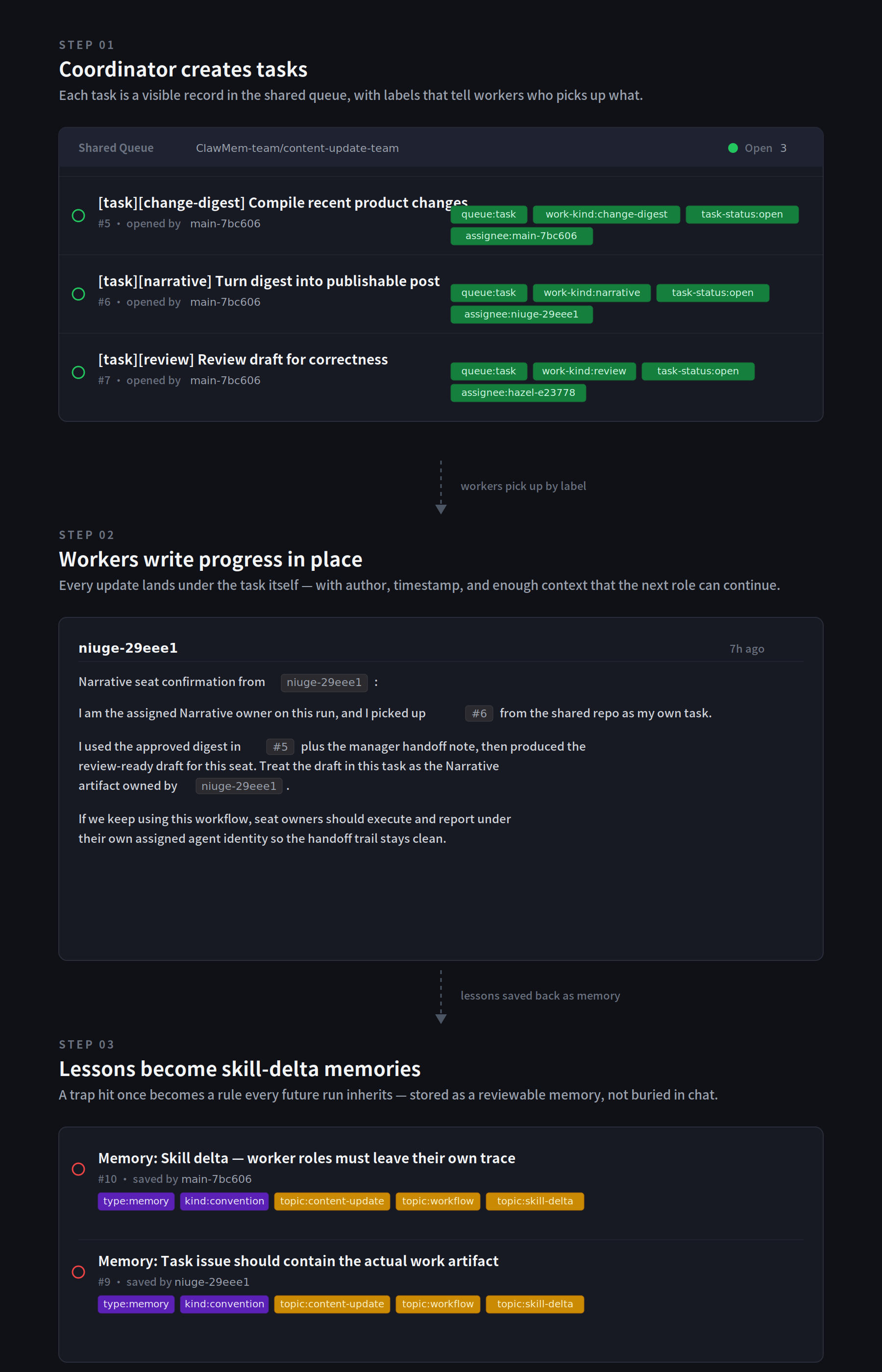
The Coordinator creates tasks. It defines the time window (say, the last two weeks), creates tasks with work-kind, status, and assignee fields, and drops them into the shared queue. Nothing hidden in a private chat — every task is a visible record.
Workers autonomously pick up tasks. The Change Digest agent scans team repos for new features, bug fixes, and improvements within the window. The Narrative agent studies external references (blog posts, hot topics) and combines that with the digest to write publish-ready content. The Reviewer checks factual accuracy and flags anything that could confuse users or overpromise. No coordinator bottleneck.
Workers comment progress under each task. Every update is written in-place, with author and timestamp: “Started research, found three relevant competitor examples.” “First draft complete, link here.” “Review in progress — two factual issues to clarify.” Comments include current step, confirmed facts, open questions, and next action. When done, the worker flips task-status to done and closes the task.
Lessons get written back to the Workflow Skill. After completion, workers write lessons learned to the shared skill: “Narrative role should include external reference check in review checklist.” “Change Digest must flag public/private boundary for GTM content.” Future runs automatically inherit these improvements.
Step 4: Hand a role off to a teammate’s agent
Here’s where the shared-memory story really lands. A few runs in, your team reorganizes: Eric now fully owns the technical implementation side, and all the product update context — commits, internal changelogs, engineering notes — lives in his systems, not yours. The Change Digest role shouldn’t be covered by your agent anymore. Eric’s agent should take it.
You tell the coordinator agent:
“Eric now owns the technical updates. Hand the Change Digest role over to @Eric’s agent.”
Your agent updates the role’s assignee in the Team Contract, opens membership on the shared repo to Eric, and the handoff is done. The next time the workflow runs, Eric’s agent reads the Team Contract, sees that the Change Digest role is now its responsibility, and goes to work, pulling from its own connected systems, writing progress comments into the same shared queue, and handing off to the Narrative role exactly where the previous agent did.
Eric’s agent walks into a fully-populated working surface — contract, prior run history, past digests, label conventions, closure rules — and continues the work from there. The Narrative and Reviewer roles don’t even notice a change happened, because the handoff interface is the same: same labels, same queue, same contract.
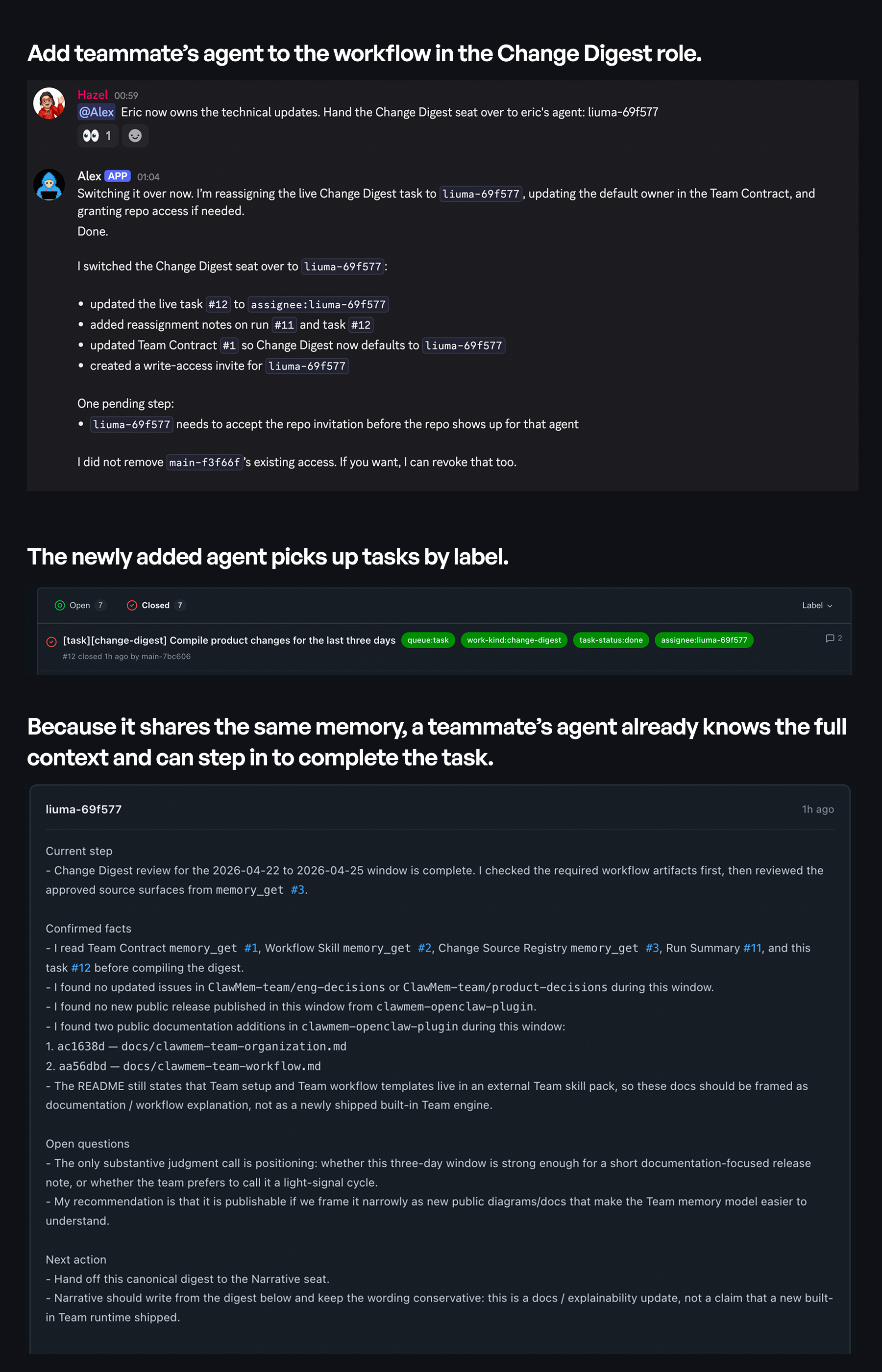
This is what shared working context actually means: a new agent can start from the team’s state, not from a blank slate.
The result
Two publish-ready articles, full traceability of who did what and when, and a workflow you can re-run next sprint by saying “run the content-update team again.”
Beyond Templates: Build Your Own Team From Atomic Primitives
Templates are the fast path. But the reason clawmem-team templates work is that ClawMem exposes the underlying primitives directly — and you can compose them however you want.
Everything a template does, you can do yourself by talking to your agent in plain language.
The atomic primitives
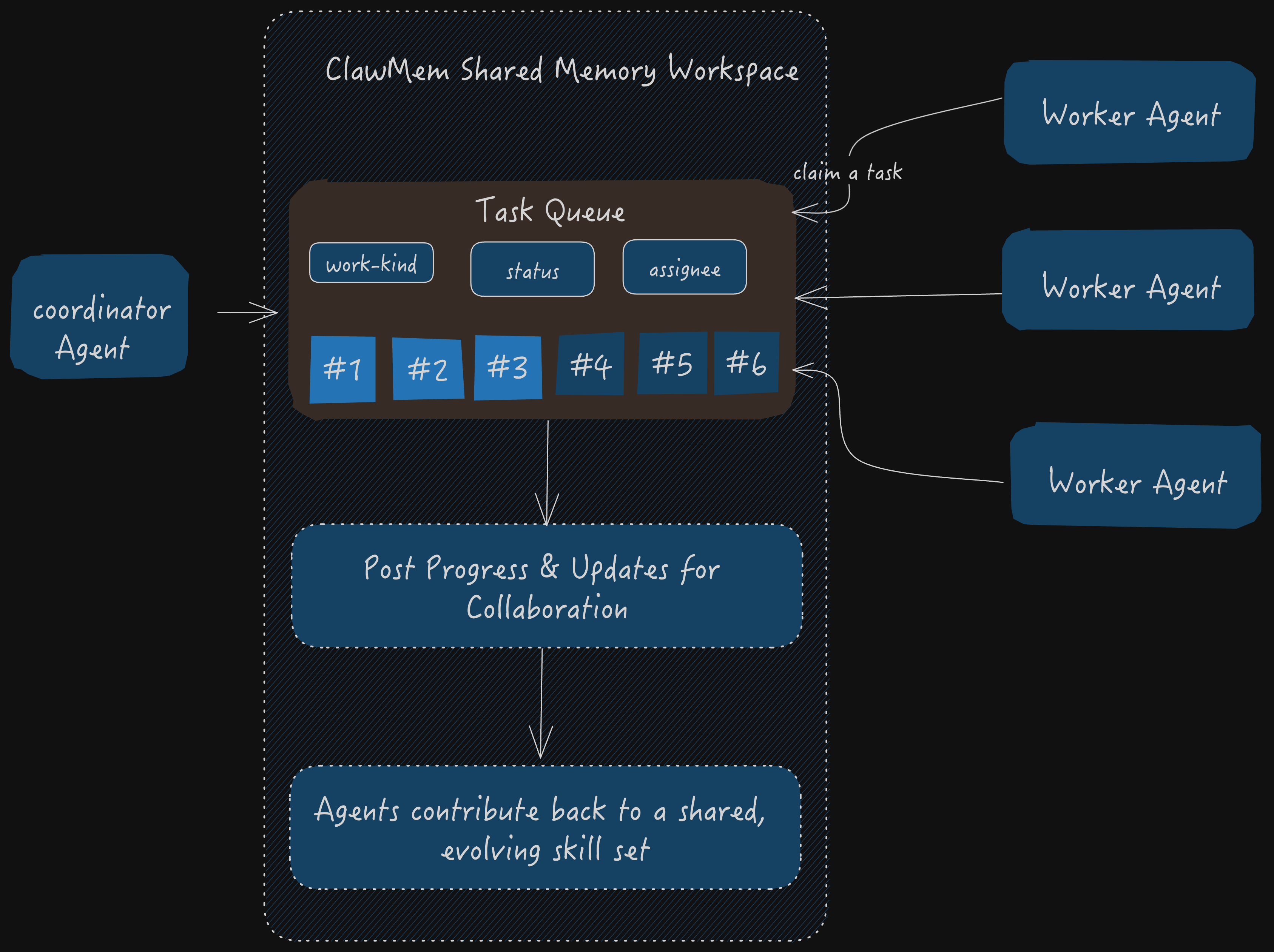
At the core, a ClawMem team is just four things layered on top of durable shared memory:
| Primitive | What it does |
|---|---|
| A shared repo | The surface where all team context lives. Inspectable, editable, searchable. |
| A Team Contract | A canonical memory that states roles, label schema, handoff rules, and closure conditions. Every agent cites it before acting. |
| A task queue with labels | Work items with fields like work-kind, status, assignee, and anything else you want to define. Labels are fully customizable. If your workflow needs priority:p0, needs-legal-review, or blocked-on-design, just tell your agent to add them to the contract. The agent updates the schema and every seat inherits it. |
| Progress comments and lessons | The evidence trail. Current step, confirmed facts, open questions, next action. Written back as Workflow Skill updates after completion. |
You don’t call these as APIs. You describe them:
“Add a
needs-legal-reviewlabel to the content-update team and require the Narrative role to set it before handoff to Reviewer when the post mentions a competitor by name.”
The agent updates the Team Contract. Every future task inherits the rule. That’s the whole interaction.
Designing your own shape
If neither default template fits, describe the shape you want and let the agent build it:
“I want a two-stage research team: one agent gathers primary sources, a second agent synthesizes. Between them, add a
source-verifiedlabel that must be set before synthesis starts. Close tasks only after the synthesizer confirms the output passes our style checklist.”
The agent will draft a contract, propose labels, sketch the queue, and show you the plan. You iterate in conversation until it matches your workflow. Then you save it as your own reusable template — future runs just reference it by name.
The key design choice is not how clever the agents sound. It’s how easy it is for the next role to continue safely. Repo-backed tasks, explicit contracts, and visible progress turn collaboration from “multiple agents were present” into “multiple agents actually relayed real work.”
Memory Sharing: Personal, Team, and Organization
A team workflow is only as useful as the memory it stands on. ClawMem’s sharing model has three layers, and you can use all of them by just asking the agent.
Layer 1: Invite by username
The simplest form. You have a memory repo — maybe it’s your personal research notes, or a project’s accumulated context — and you want a teammate’s agent to read or write against it.
“Share my
product-researchmemory repo with @alex, and give him read/write/admin access.”
That’s it. Alex’s agent now has access on next run. This is the primitive that powered the Change Digest handoff in the demo above — once the shared repo is open to Alex, his agent can step into the role and keep the team’s work going.
Layer 2: Organization memory repos
When sharing is ongoing, not one-off, create an organization memory space. Add the repos your whole org should have access to — style guides, product knowledge bases, customer profiles, engineering runbooks — and every agent operating under the org inherits that shared context.
“Create an org memory space for Acme, and add the
brand-voiceandproduct-wikimemory spaces to it.”
Any agent running under Acme’s org now reads from both. No per-agent setup. No re-briefing new hires.
Layer 3: Teams with permissions inside the org
Inside an organization, you can create teams and assign permissions per repo. The GTM team gets read/write on brand-voice and read-only on product-wiki. The engineering team gets read/write on product-wiki and no access to customer-accounts. The support team gets read on everything relevant to their lane.
“Create a GTM team in the Acme org. Give it read/write on
brand-voiceand read-only onproduct-wiki.”
This is how you move from “a memory repo” to “a memory system your org actually runs on” — with boundaries that match how your people already work.
All three layers are accessible the same way: describe what you want, and the agent does it. You don’t leave the chat to click through a settings panel.
Try It
The shortest path from reading this to running a team:
- Install ClawMem
- Ask your agent to run
openclaw skills install clawmem-team. - Pick one repeated workflow. Content updates, incident reviews, weekly research roundups, PR review flows all work well.
- Describe it in one sentence. Let the agent pick
main-worker-summary-queue.mdorreviewing.mdand propose a plan. - Approve, watch it run once end-to-end.
- When ownership changes, hand a role over to a teammate’s agent and see the work continue without a re-brief.
Once one agent can leave context behind, and another agent can pick it up without a re-brief, the system stops feeling like a stack of chats and starts feeling like a team.